Toyo Tires 80th anniversary limited edition 1:43 scale RC car
1:43 scale high speed four wheel drive RC drift/Race car
Instruction manual (Gyroscope model)
AS SUPPLIED BY RC CAR MANUFACTURER (wintidebrand.com)
Package contents:
1 x Model car
1 x Remote radio controller
1 x Instruction manual
1 x Type-c Charging cable
8 x Race pylons
4 x Racing tire - soft rubber grip compound
4 x Drift tire - hard rubber compound*
(*one set installed on car)
Battery precautions:
1. It is recommended to use 4 - 1.5V AAA alkaline battery to power the remote control.
2. Do not mix alkaline batteries or rechargeable batteries.
3. Ensure that the batteries are installed correctly.
4. Do not short circuit the power terminal.
5. Battery replacement should be done by an adult.
*When the controller is turned on a slow blinking light during the startup process indicates that the batteries are low and need to be replaced.
Need to buy:
4 x AAA 1.5V battery for controller
Care and maintenance:
1. Avoid long-term exposure to the sun or high heat.
2. Check whether all screws are secured.
3. During storage it is recommended to remove the batteries from the controller. Store in a dry cool area.
Remote control battery installation:
1. Loosen the outer screws to the battery compartment and lift the lid.
2. Install the four 1.5V AAA batteries ensuring the correct polarity (+/-). Be sure the recycle any used batteries.
3. Close the battery cover and tighten the screws
 |
| Step 1 |
 |
| Step 2 |
 |
| Step 3 |
RC car operation and controller description :
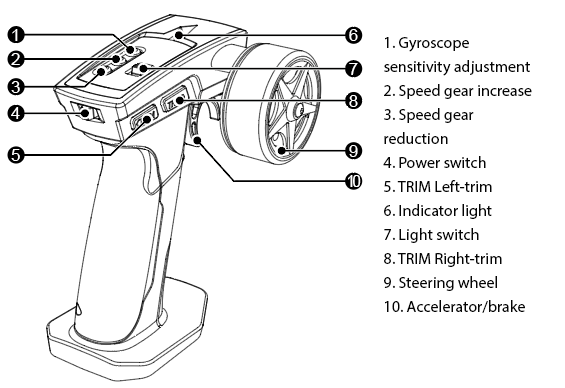
1. Toggle the controller switch to the ON position to initiate start-up. ④ The frequency is automatically adjust.
During startup the remote control throttle trigger and steering wheel should not be engaged. They should be in
a neutral position.
2. The vehicle has 3 gears which are adjust with the remote control Speed gear increase ② and decrease buttons. ③
The remote control indicator will be red for high-speed, yellow for medium (50%), green for low speed (20%), adjust
the speed according to different tracks.
3. You may adjust the straight line path of the vehicle by using the Trim left ⑤ and Trim right ⑧ controls.
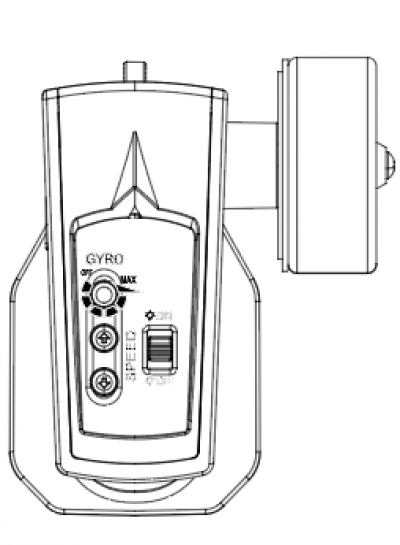
4. The remote control car has a high-precision gyroscope function. You can adjust the gyroscope sensitivity through the knob ① to adapt to different track environments for improved control.
5. The ⑦ button on the remote control adjusts the car’s lights.
6. You may use the vehicle in two different modes by alternating the tires supplied: racing tires for added grip.
Or drifting tires for added slip.
(Model 4303 has a staggered tire fitment. Be sure that the smaller tires go on the front of the vehicle, larger in the rear.)

Two different modes:
For more grip in high-speed corners, change to softer racing tire.
For continuous drift around the pylons, change the hard drifting tire.
Operating tips:
1.For optimum reception the car should not go beyond 20 meters from the remote control. Beyond this distance you may lose some or full control of the car.
2.Vehicle can be used for approximately 30 minutes after a full charge.
How to operate the remote control car:
1. To accelerate press the throttle trigger backwards. Note: How the controller is held may affected the speed of the car.
2. To brake the vehicle push the throttle trigger forward, then return to the neutral position. Continuing to hold the trigger forward, initiates the reverse function. Note: How the controller is held may affected the speed of the car.
3. The steering wheel controls the steering of the car by rotating left and right. How the controller is held may affect how the vehicle responds to the turning command.
Vehicle charging precautions: Important!
Before charging, ensure that the vehicle power switch is in the OFF position.
Use a conventional mobile phone charging adapter along with the Type-C charging cable supplied.
Charging time is approximately 30 minutes. The charging indicator light will turn off when the charging cycle is complete. Once charge is complete disconnect the cable. DO NOT leave the cable connected longer than needed.
*During the operation of the vehicle, if the steering response is slow or non existent, the batteries in the controller may need to be changed. This may be indicated by the lights continuing to flash quickly. It is also suggested to turn off and charge the vehicle at this time.
 | Attention: Do not use a USB Fast Charge to charge the car. This could result in damage to the battery and/or the circuit board. There is also a risk of fire leaving an unattended charge. The charging power should not be greater than 25 watts. |
Attention:
1. For safety reasons charging must be done by or supervised by an adult.
2. This product is suitable for use by operators 14 years of age or older. Use under 14 years old may cause harm or damage to the product.
3. The product it not waterproof. Operate in a dry clean environment.
4. Keep all parts and accessories out of reach of small children.
5. The battery in the car is 3.7V lithium battery, please do not puncture the battery or attempt to remove it. There is a risk of fire to a damaged battery.
6. Do not use high-power mobile charger to charge the vehicle. Doing so creates a risk of fire and other safety hazards to the car and local environment.
6. Check whether the wires, plugs, shells and other parts ensuring they are not damaged before charging. Do not charge if damage is evident.
7. Pay attention to the polarity of the 4- AAA 1.5V batteries during installation to the remote control.
8. The remote control car battery is 200mAh 3.7V high-performance lithium battery. If damaged, replace immediately.
Driving skills:
1. Pylons can be arranged indoors for drift practice to improve driving skills.
2. A racing track may also be designed to practice and measure speed skills.
| Common Issues | Troubleshooting method |
| The controller power-up process has completed, yet the indicator light continues to slowly blink. | 1. Remove the AAA batteries and check whether the positive and negative terminals are correctly installed and connected 2. Check whether the battery is powered on. If the indicator blinks slowly, the battery is low 3. If the battery cover is not properly installed, check whether the battery cover is properly installed and tighten the screws on the battery cover |
| The vehicle cannot drive in a straight line | 1. Adjust the remote control trim setting until the vehicle drives straight 2. Check whether there is any debris impeding any of the four wheels. Remove and clean any foreign objects |
| After the controller power up process is complete, the remote control does not operate, and the wheels are spinning | 1. Turn off the remote control and make sure the throttle trigger and steering wheel turn on the remote control in the middle position |
| Vehicle steering failure or vehicle power failure, lights flashing | 1. The vehicle is out of power, charge the vehicle |
| The vehicle has no reverse function | 1. Turn off the remote control and reset the frequency 2. The first forward push of the throttle trigger is the brake function, and the second forward push of the throttle trigger after the throttle returns to the neutral position should initiate the reverse function |
| When the vehicle is driving, resistance is slowing the car, or it cannot drive at all | 1. Check whether the four tires are installed correctly or have not become dislodged 2. Check whether there is any debris impeding any of the four wheels. Remove, and clean any foreign objects in the tires |
| There is no response to the vehicle remote control or there is a delay in steering response | 1. The controller battery is out of power, replace the batteries 2. The vehicle is beyond the controller range, ensure that the vehicle is within 20 meters of the controller 3. There may be signal interference nearby, relocate the controller in relation to the car |
FCC Compliance Statements
This device complies with Part 15 of the FCC Rules. Operation is subject to the following two conditions: (1) this
device may not cause harmful interference, and (2) this device must accept any interference received, including
interference that may cause undesired operation.
Note: This equipment has been tested and found to comply with the limits for a Class B digital device, pursuant to
Part 15 of the FCC Rules. These limits are designed to provide reasonable protection against harmful interference
in a residential installation. This equipment generates, uses and can radiate radio frequency energy and, if not
installed and used in accordance with the instructions, may cause harmful interference to radio communications.
However, there is no guarantee that interference will not occur in a particular installation.
If this equipment does cause harmful interference to radio or television reception, which can be determined by
turning the equipment off and on, the user is encouraged to try to correct the interference by one or more of the
following measures:
---Reorient or relocate the receiving antenna.
---Increase the separation between the equipment and receiver.
---Connect the equipment into an outlet on a circuit different from that to which the receiver is connected.
---Consult the dealer or an experienced radio/TV technician for help.
Caution: Changes or modifications not expressly approved by the party responsible for compliance could void
the user’s authority to operate the equipment.
This equipment complies with FCC radiation exposure limits set forth for an uncontrolled environment.
This transmitter must not be co-located or operating in conjunction with any other antenna or transmitter.